Token Replay Attacks Compromise Microsoft 365 Accounts at 79 Organizations
Huntress reported that attackers replayed stolen Microsoft 365 sign-in tokens to get past MFA at 79 organizations, leaving at least 48 rogue Entra devices.
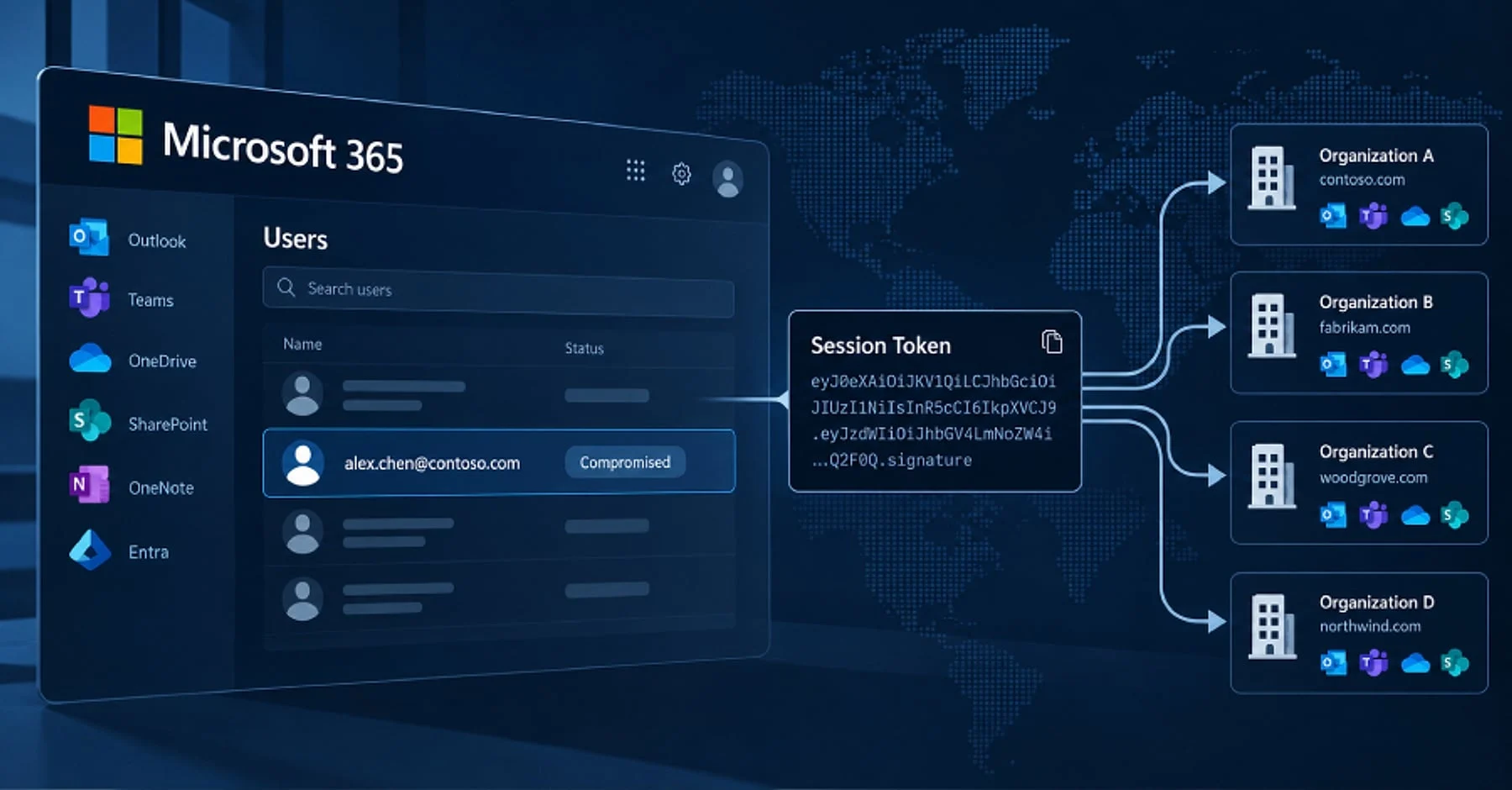
Huntress reported that attackers replayed stolen Microsoft 365 sign-in tokens to compromise accounts at 79 organizations between 14 July and 22 September 2026. The Hacker News put the total at 97 compromised accounts and at least 48 rogue devices registered in Microsoft Entra ID. The Huntress blog post is dated 22 October 2026.
How Stolen Sign-In Tokens Get Past MFA
Microsoft 365 issues a session token once sign-in, including MFA, is complete. Because the token is minted after MFA, whoever holds a copied token can use it without the password or a new MFA prompt. Huntress says the attackers obtained tokens from multiple sources, including: adversary-in-the-middle pages that relay the real login and MFA prompt while keeping the resulting session token, device-code phishing, and social engineering during an ordinary sign-in.
According to The Hacker News, the stolen token is replayed from the attacker’s own devices within minutes, so the attacker does not have to bypass MFA a second time. Help Net Security, citing Huntress, reports that in one July 21 case a hijacked session appeared 12 minutes after the victim reached the MFA prompt. On 22 September the gap was four minutes.
Campaign Scale
Huntress reports 497 successful Microsoft 365 sign-ins from more than 200,000 failed login attempts between 14 July and 22 September 2026, across 79 organizations.
What the Rogue Devices and MFA Changes Look Like
Huntress counted at least 48 devices registered in victims’ Microsoft Entra directories. Their names follow the pattern DESKTOP- followed by eight uppercase hexadecimal characters, such as DESKTOP-54521F46. Huntress notes that Windows’ default naming uses seven alphanumeric characters. In phase one alone, 37 rogue devices appeared across 37 organizations by 3 August.
Once registered, a device stays in the directory until someone deletes it. Huntress also says that an attacker-registered MFA method survives a password reset unless someone audits the account’s MFA methods and removes the rogue one.
In 19 organizations, existing MFA methods were wiped and a new one registered within three hours of the first sign-in from a campaign address. One rogue authenticator was labeled ‘iPhone 13’. Attackers also created hidden inbox rules with one-to-three-character or punctuation-only names that moved or deleted mail about payroll, direct deposit, bank and bonus. In one incident, an attacker sent a payroll-related email to an outside accountant and hid the replies.
What Microsoft 365 Admins Should Check and Change
Huntress recommends revoking the user’s sessions and resetting the password first, then removing attacker-registered devices and MFA methods. A password reset alone leaves rogue devices and MFA methods in place. Microsoft’s device documentation says disabling a device revokes its Primary Refresh Token and refresh tokens, while deleting it is nonrecoverable and removes details such as BitLocker keys, so Microsoft recommends deletion only when it is required.
Device registration settings sit in the Microsoft Entra admin center. If a Conditional Access policy requires MFA, the option to require MFA to register or join devices must be set to No. Microsoft recommends enforcing MFA for registration through the Register or join devices user action in Conditional Access. The per-user device limit defaults to 50. Entra audit logs record device creation.
Huntress recommends a Conditional Access policy that requires MFA or blocks sign-ins for all users, all cloud apps and all client app types. It also advises restricting the device-code flow with authentication-flow policies, and treating a sign-in blocked with error AADSTS53003 as a sign of a valid stolen credential rather than a successful defense.
Microsoft’s token protection control accepts only device-bound sign-in session tokens from supported apps. It covers native apps on Windows, iOS, iPadOS and macOS for Exchange Online, SharePoint Online and Microsoft Teams. Browser-based support is in preview and limited to selected web apps that access Azure Resource Manager. Microsoft recommends a report-only policy before enforcement.
A password reset alone leaves rogue devices and MFA methods in place.
Key Figures, Dates and Source Differences
Huntress reports 497 successful Microsoft 365 sign-ins from more than 200,000 failed login attempts between 14 July and 22 September 2026. The failed attempts traced to the 193.26.115.0/24 address range, which Huntress links to the hosting provider 1337 Services GmbH.
Huntress reports 303 successful sign-ins across 29 organizations over four days from 11 September, and 232 successful sign-ins across 28 organizations for 193.26.115.72 in its mitigation guidance. Help Net Security describes the 11 September activity as nearly 30 organizations. Huntress reports that the 1,052 sign-ins blocked at 193.26.115.72 all came from four organizations, and Help Net Security says the same address was blocked 1,052 times.
The Hacker News quotes Huntress researchers Andrea Hatcher, Susannah Matt, Matt Poto and Andrew Schwartz, who are credited on the blog post, as saying the attacker replayed sign-in tokens stolen from victims rather than guessing passwords. They also said Conditional Access policies can help fill some of the security gaps that MFA can’t, as long as they’re appropriately implemented.
Huntress’s post includes indicators of compromise and mitigation guidance for administrators. Help Net Security, citing Huntress, reports that on 11 September an automated program reused captured tokens and completed hundreds of successful sign-ins at nearly 30 organizations over four days.
Get more stories like this in your inbox by signing up for the EW newsletter, The Entrepreneurs Weekly’s free digest of founder stories and business news.